
 русский
  Español
  عربى
عربى Industry News

GET A QUOTE
How Wholesale Smart Lock Improves Access Management
Shared access creates shared risk — and many building operators underestimate exactly how much risk accumulates from a single untracked key. Hand a physical key to ten people and the key has, in a practical sense, left the building permanently. It gets copied at the hardware store, lent to a partner who lends it to someone else, dropped in a parking lot with no way of knowing whether it was found by the right person or the wrong one. Traditional lock hardware has no answer for any of this. There is no log, no revocation mechanism, no way to limit access to Tuesday afternoons only, no alert when someone enters at 2 a.m. The Wholesale Smart Lock category exists precisely because physical key management cannot solve these problems — and multi-user access control is the architecture that makes smart locks genuinely useful rather than just convenient.
Why Physical Keys Are a Structural Security Problem
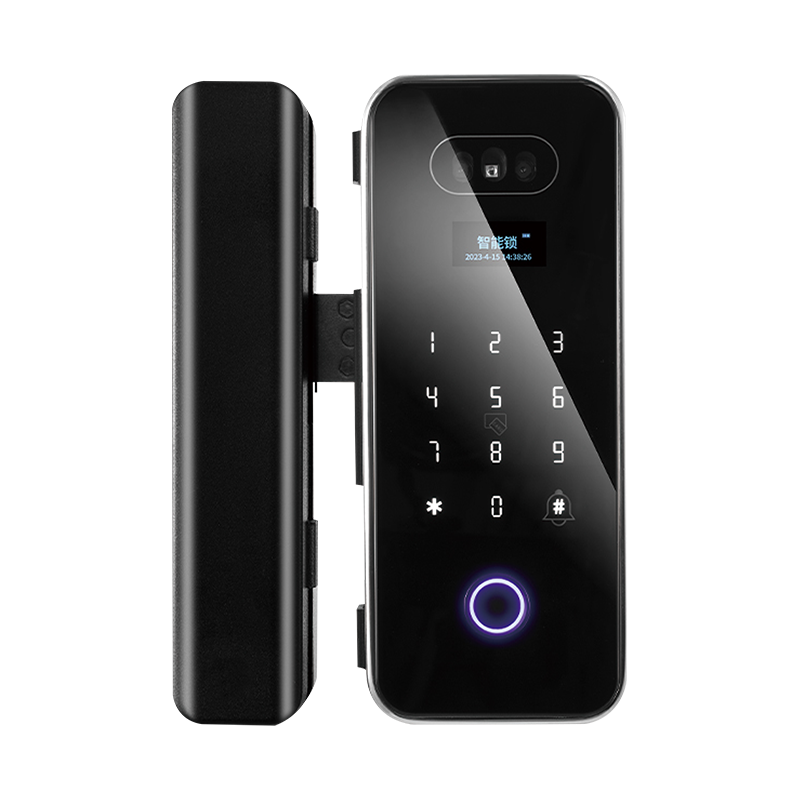
The Binary Credential Problem
A key is a yes-or-no device. It either opens the lock or it does not. There is no embedded concept of who is holding it, when they should have access, or what level of authorization they carry. In any shared environment — a family home, an office, a rental property — this creates an immediate ceiling on what security is possible. The lock cannot tell the difference between a facilities manager with permanent access rights and a contractor who should have been on site only yesterday.
This is not a problem that better physical keys solve. The limitation is structural. The moment a credential can be duplicated, transferred, or lost without any record, the access control model has a gap that no amount of lock quality can close.
What Happens When Access Is Not Tracked
A mechanical lock leaves nothing behind. No entry time. No user identity. No record of failed attempts. When a theft occurs in an office over a long weekend, or a valuable item goes missing from a shared home, the investigation starts from zero. Insurance claims are harder to substantiate. Repeated unauthorized entries in a rental property go undetected until the damage is already done.
The absence of an audit trail is not just an inconvenience — it removes accountability from the access model entirely. People who know there is no log behave differently than people who know their entry is recorded. This is one of the less obvious security benefits of access control systems: the log changes behavior before anything goes wrong, not just after.
How Multi-User Access Control Works
Individual Credentials Replace Shared Hardware
Rather than one key that grants access to whoever holds it, a multi-user system assigns credentials to individuals. Each person's identity in the system is separate — a PIN, a fingerprint, an app credential, or a physical card — and each identity carries its own permission set. Two people can both have access to the same door but with different time windows, different authorization levels, and different logging entries when they use it.
The roles that structure this vary by environment but typically follow a three-tier pattern:
Administrator: Unrestricted access with the ability to add, modify, or remove all other users. This role sits with the building owner, the office manager, or the IT team, depending on the deployment.
Standard user: Access within defined parameters. An employee might have access to their floor between certain hours, with no access to server rooms or executive areas.
Temporary user: Time-limited credentials that expire without any manual intervention. A contractor gets access from Monday to Friday of a specific week. A rental guest gets access from check-in to checkout. The code stops working the moment the window closes.
Credential Revocation Changes the Security Calculus
The practical significance of software-managed credentials only becomes clear when someone leaves. With physical keys, a departing employee means a rekeying decision — which costs money, creates disruption, and usually gets deferred until there is a reason not to. With a digital access system, removing a former employee's credential is a software action that takes under a minute and takes effect immediately across every door they had access to.
This changes the cost-benefit calculation for keeping access management current. The friction that causes organizations to leave departed employees in key possession for weeks disappears when revocation requires no hardware interaction.
Remote Control Removes the Geographic Constraint
An administrator managing a smart lock system does not need to be on site to make changes. A property manager can grant a maintenance contractor access for a specific two-hour window from a phone while traveling. A building supervisor can lock down a compromised entry point remotely when notified of a security incident. A homeowner can let in a delivery or verify that a door was secured after leaving without turning around.
This is not a convenience feature in the way that remote car start is a convenience feature. Geographic independence in access management is a functional security improvement — it means the response time to an access-related problem is measured in seconds, not in however long it takes someone to physically reach the site.
Where Different Door Types Create Different Requirements
Smart Lock for Home Door: Household Access Without the Key Drawer
The residential use case for a Smart Lock for Home Door is less about sophisticated security architecture than about replacing the household friction of physical keys with a system that actually tracks who has access and when. Children no longer need to carry keys that can be lost at school. A weekly house cleaner has access precisely when they should and not otherwise — no spare key in a lockbox that anyone nearby can observe. An elderly parent who visits frequently has permanent access without needing to coordinate key handoffs.
Where the security benefit goes beyond convenience is in the audit trail. A parent who wants to confirm that a teenager arrived home, or a homeowner who needs to verify whether a service visit actually occurred, can check the access log rather than making phone calls. The log is passive — it requires no action and creates no friction — but it is there when it is needed.
Smart Lock for Office Door: Managing Access at the Department Level
Office access is a layered problem. A single floor might have general areas that all employees access, meeting rooms that specific teams book, storage areas that facilities staff manages, and server rooms that only IT enters. Physical keys handle this poorly — the number of different keys required grows quickly, and tracking who holds what becomes its own administrative burden.
A Smart Lock for Office Door deployment allows access to be configured per user rather than per key. An employee joins and receives credentials for the areas relevant to their role. They change teams and the access configuration updates to match. They leave and the credentials are removed. In a multi-tenant commercial building, this same architecture separates tenant access entirely — each tenant's administrator manages their own user set, and the building-level administrator controls shared access points without tenant credentials interfering.
The access log in an office context also creates compliance value. For environments where regulatory requirements include proof of who accessed which systems or areas, the timestamped entry log is a documentation resource rather than just a security feature.
Smart Lock for Wooden Door: Retrofit Without Structural Changes
Wooden door frames present a specific installation challenge. Many residential buildings and older commercial properties have door frames built before electronic hardware was a consideration, and the assumption that improving their security requires door replacement has caused a lot of organizations to defer the upgrade indefinitely.
A Smart Lock for Wooden Door applications bypasses this by providing retrofit-compatible hardware that installs within standard frame dimensions. The mounting geometry, the cylinder depth, and the deadbolt throw are designed around existing wooden door configurations, not new construction standards. The security upgrade is real — the full access control feature set applies — but the installation disruption is comparable to replacing a standard lock rather than replacing a door.
For property managers upgrading security across a portfolio of older residential buildings, this retrofit pathway compresses the cost and timeline of the project substantially.
Single-User vs Multi-User Systems: The Practical Gap
| Feature | Single-User System | Multi-User Access Control |
|---|---|---|
| Credential type | One shared method | Individual per user |
| Permission levels | None | Admin, standard, temporary |
| Access logging | Unavailable | Timestamped, exportable |
| Remote management | Limited or none | App-based, location-independent |
| Credential revocation | Requires hardware change | Immediate software action |
| Scalability | Single door context | Multi-door, multi-site |
| Risk on personnel change | Full rekeying required | Credential removal only |
The gap above is not primarily a hardware gap. A single-user smart lock and a multi-user smart lock may share the same physical form factor, the same installation process, and the same exterior finish. The difference is in the access management infrastructure behind the hardware — and that infrastructure is where the actual security improvement lives. Keyless entry without access logging and user-level permissions is an improvement on convenience, not on security.
What Enterprise and Wholesale Buyers Should Evaluate
Software Capability Drives System Value
The physical lock is the visible part of the system. The software platform is where the security architecture actually operates. Buyers evaluating systems for multi-door or multi-site deployment should spend as much time assessing the software as the hardware: how user provisioning works, whether the log is exportable in usable formats, how permission changes propagate across multiple devices, and whether the platform integrates with existing HR or building management systems.
A platform that cannot connect to organizational systems requires manual synchronization between access permissions and HR records — which introduces exactly the kind of administrative gap that leaves departed employees with active credentials.
Wholesale Smart Lock Sourcing for Volume Deployment
Deploying access control across a distributed portfolio of buildings, a large commercial property, or a chain of rental units creates procurement requirements that differ from single-site buying. Consistent hardware specification matters because administrators and installers working across multiple sites benefit from uniform equipment. Volume pricing structures the economics of the rollout. Coordinated delivery reduces installation scheduling complexity.
A Wholesale Smart Lock supplier with enterprise deployment experience is a different kind of supply partner than a consumer electronics distributor. The questions they can answer — about configuration standards, firmware versions, integration support, and after-sale service for distributed deployments — determine how the rollout performs in practice rather than in a product demo.
OEM Configuration from a Smart Lock Factory
For buyers building a proprietary security product or integrating smart lock hardware into a larger access control platform, factory-level OEM engagement is the appropriate sourcing path. A Smart Lock Factory with genuine OEM capability works from a technical specification rather than a product catalog — modifying firmware for specific permission structures, configuring hardware for integration with proprietary management software, and supporting the development process from prototype through production validation.
The distinction between a factory that relabels standard products and one with actual OEM engineering depth shows up at the integration stage, not during the initial quotation.
A Working Framework for Access Control Implementation
Organizations moving from physical keys to a multi-user access control system tend to underestimate the process work relative to the hardware selection. The five decisions that determine whether the implementation holds up:
- Map access requirements before selecting hardware. Who needs access to which doors, in what time windows, at what permission level. The access map is the specification that the system is built around — hardware chosen without it will need to be reconfigured.
- Define the administrator structure. Who holds the admin credential, who can grant access to others, and what the escalation path is when the primary administrator is unavailable. Systems with no documented admin structure create access management bottlenecks.
- Confirm hardware compatibility with existing door types. Wooden frames, metal frames, different deadbolt configurations, and varying frame depths all affect which hardware installs without modification. Verify before ordering.
- Build a credential lifecycle process. The process for issuing, modifying, and revoking credentials when users join, change roles, or leave should be written down and owned by a specific role. Access management that relies on informal communication accumulates errors.
- Schedule access audits. A quarterly review of who holds active credentials and whether their access level still matches their current role catches the drift that accumulates between formal reviews. Access that was appropriate at hire may not be appropriate eighteen months later.
Bringing the Decision Together
The security case for multi-user access control systems is not about making physical doors harder to penetrate. A well-installed deadbolt already handles that. It is about replacing a credential model — the shared physical key — that has no memory, no accountability, and no revocation mechanism with one that has all three. The audit trail changes behavior. The role-based permissions prevent credential creep. The remote management capability compresses response time when something goes wrong. And the retrofit compatibility of current smart lock hardware means that the upgrade path is open for wooden door frames, older commercial properties, and residential buildings that were built before any of this technology existed. For buyers sourcing across home, office, or commercial door applications — whether evaluating a single site or a distributed deployment — hardware selection, software platform depth, and supply chain support each shape how the system performs after installation rather than during a demo. Yongkang Ruian Lock Industry Co, Ltd. works with wholesale buyers and OEM partners across standard and custom smart lock configurations, with product options covering home door, office door, and wooden door applications and technical support for access control system integration.
Recommended Products

Ready to Begin?
Product Categories
Contact Information
 Email: [email protected]
 Phone: +86-13575699186
 Address: No.135, Wanyu Road, Zhiying Industrial Zone, Yongkang City, Zhejiang Province, China.
QR Code
Copyright © Yongkang Ruian Lock Industry Co, Ltd. All rights reserved.
