
 русский
  Español
  عربى
عربى Industry News

GET A QUOTE
Smart Lock for Home Door: WiFi vs Bluetooth Guide?
Choosing a smart lock is rarely as simple as picking the one that looks good on the door. Property managers, real estate developers, and homeowners upgrading their access control setup run into the same friction point — connectivity options that each come with trade-offs that are not always obvious from a product listing. A Smart Lock for Home Door needs to do more than just open and close reliably. It has to fit the existing network infrastructure, support the level of remote access the household actually needs, and remain functional when something in the tech stack changes. The choice between WiFi and Bluetooth is not a minor detail. It defines the entire user experience.
Understanding How WiFi Smart Locks Connect
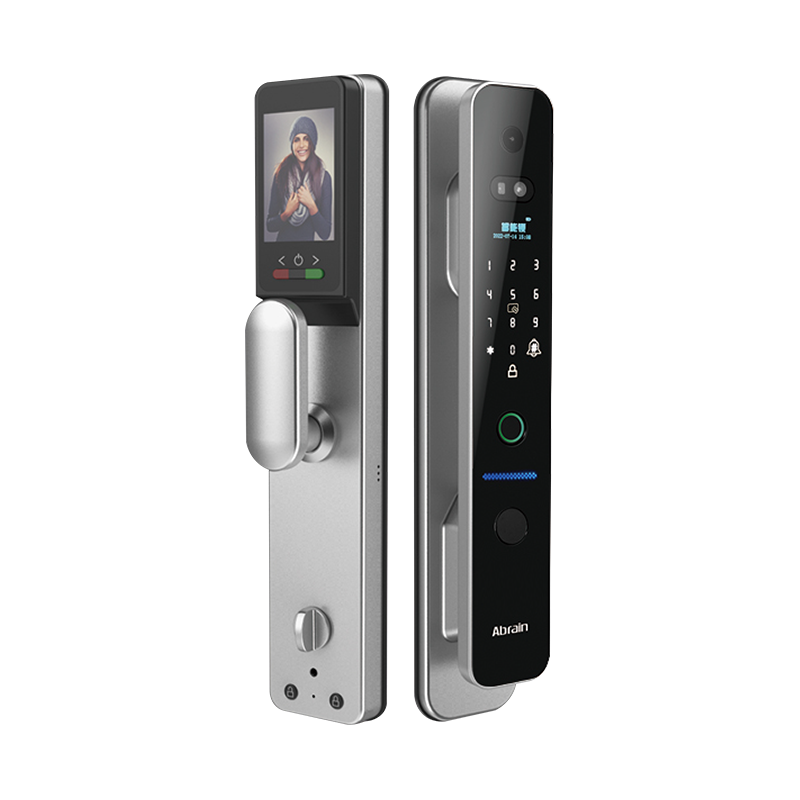
WiFi Locks Use the Home Network as the Communication Layer
A WiFi smart lock connects directly to the home router using the same wireless frequency bands that other household devices use. Once connected, it maintains a persistent link to the internet — which means it can receive commands, transmit status updates, and interact with cloud services at any time, from anywhere with an internet connection.
The operational implications of this are significant:
- The lock can be locked or unlocked remotely from across the city or across the world
- Real-time alerts — door opened, access denied, battery low — can be pushed to a smartphone as they happen
- Integration with voice assistants, smart home hubs, and other connected devices is typically simpler because WiFi devices are already on the same network layer
- Access logs are recorded continuously, which matters for property managers tracking entry and exit across multiple units
The persistent connection is the defining feature. It is also the reason WiFi locks draw more power than Bluetooth equivalents — maintaining a continuous network link consumes energy, which translates to shorter battery life per charge cycle.
How Bluetooth Smart Locks Operate Differently
Bluetooth Locks Communicate Directly With a Nearby Device
Rather than connecting to a router, a Bluetooth smart lock pairs directly with a smartphone or other Bluetooth-enabled device. The lock listens for a recognized device and responds to commands when that device comes within range — typically somewhere between a few meters and a broader radius depending on the Bluetooth version the lock uses.
What this means in practice:
- No router, no internet connection, and no cloud account is needed to operate the lock in its basic configuration
- The lock works even when the internet is down, as long as the paired device is present
- Battery life is considerably longer because the radio is dormant until it detects a known device in range
- Some Bluetooth locks support hands-free unlock — the door opens as the owner approaches, without needing to take out the phone
The limitation is coverage. Without a hub or gateway device that bridges Bluetooth to the internet, a pure Bluetooth lock cannot be operated remotely. If you are ten kilometers from home and need to let someone in, a standalone Bluetooth lock cannot help.
Remote Access: The Factor That Separates the Two Technologies
Does Remote Unlock Matter for Your Specific Situation?
This is the question that often resolves the comparison. Remote access is not a feature everyone needs to the same degree, and the answer shapes which technology is the right fit.
Situations where WiFi remote access makes a real operational difference:
- Rental properties where guests, cleaners, or contractors need to be let in while the owner is absent
- Households where family members frequently forget keys and need a remote unlock from someone at work
- Property managers overseeing multiple units who need to issue and revoke access codes without being on-site
- Short-term rental operations where access needs to be granted and cut off for each booking cycle
- Office environments where after-hours access for specific staff needs to be controlled remotely
Situations where remote access is rarely needed and Bluetooth is sufficient:
- Single-family homes where all household members have a phone and are present when they need access
- Secondary entrances like garage service doors where the owner is always nearby
- Interior doors within a property where remote operation adds no practical value
- Situations where network reliability is uncertain and a lock that works without internet is preferred
- Neither technology is inherently better in the abstract. They are better suited to different operational patterns.
Battery Life and Power Management
WiFi Locks Consume Significantly More Power Than Bluetooth Models
This is not a controversial statement — it is physics. Maintaining a continuous radio connection to a network router uses power at a baseline rate that Bluetooth does not match. A WiFi lock radio is active constantly. A Bluetooth lock radio is dormant nearly all of the time.
The practical consequence:
- WiFi locks typically require more frequent battery replacements or recharging cycles
- In high-traffic installations — apartments, offices, properties with many daily lock-unlock events — this compounds, because each operation also draws power
- Bluetooth locks in moderate-use home settings can often go considerably longer between battery changes, which reduces maintenance friction
For property managers running a Smart Lock for Office Door or managing a portfolio of Smart Locks for Wooden Door installations in residential buildings, the battery maintenance schedule is an operational cost that adds up. Choosing Bluetooth where remote access is genuinely not required reduces this overhead.
Some WiFi locks address the power consumption problem through hybrid designs — a Bluetooth radio for local operation and a WiFi module that activates only when a cloud command is needed. This extends battery life while preserving remote access capability, though it adds product cost and complexity.
Security Considerations in Both Technologies
How Does Connectivity Type Affect Security?
Both WiFi and Bluetooth smart locks have well-established security profiles. The concerns are different for each.
WiFi lock security considerations:
- The lock is connected to the internet, which means the security of the cloud account and the server infrastructure matters
- A compromised cloud account can theoretically allow unauthorized access — strong passwords and two-factor authentication are essential
- Firmware updates are delivered over the network, which keeps security patches applied but also creates a brief update window
- Network-level attacks targeting smart home devices are real, though manufacturers of quality locks use encrypted protocols that make interception of commands difficult
Bluetooth lock security considerations:
- The attack surface is smaller because the lock is not network-connected by default
- Bluetooth communication is encrypted in current lock products, making signal interception attacks difficult in practice
- Physical proximity is required for any Bluetooth-based attack, which limits who can attempt one
- Replay attacks — capturing and retransmitting a valid Bluetooth unlock signal — are addressed by rolling codes in well-designed locks
For buyers evaluating Wholesale Smart Lock options across multiple units, the security profile of the specific product matters more than the connectivity technology in isolation. A poorly implemented WiFi lock is less secure than a well-implemented Bluetooth lock, and vice versa. The connectivity type sets the threat surface; the implementation determines how that surface is defended.
Installation and Infrastructure Requirements
What Does Each Lock Type Need to Operate?
WiFi lock installation requirements:
- An active home WiFi network in range of the door
- A router that can accommodate another connected device on the network
- A smartphone app and typically a cloud account with the lock manufacturer
- Stable internet access — the lock may operate on cached settings if internet connectivity is temporarily lost, but cloud-based features depend on the connection being available
Bluetooth lock installation requirements:
- No router or network infrastructure needed for basic operation
- A paired smartphone to operate the lock
- For remote access, an optional hub or bridge device that connects to the home network and relays Bluetooth commands
- Some Bluetooth locks can be operated with a keypad or fob backup that does not require a phone at all
For properties without reliable WiFi coverage at the door, or in situations where network infrastructure changes frequently, Bluetooth locks offer simpler operational continuity. A Smart Lock for Wooden Door installed on an older property without strong WiFi coverage throughout may perform more reliably as a Bluetooth model.
Comparing WiFi and Bluetooth Smart Locks Across Key Dimensions
A side-by-side comparison of how the two technologies perform across the factors relevant to home and light commercial use:
| Feature | WiFi Smart Lock | Bluetooth Smart Lock |
|---|---|---|
| Remote access | Yes, from anywhere | Only with optional hub/bridge |
| Battery consumption | Higher | Lower |
| Internet dependency | Required for cloud features | Not required for local use |
| Range of operation | Anywhere with internet | Smartphone proximity required |
| Real-time alerts | Yes | Depends on configuration |
| Setup complexity | Moderate (needs network setup) | Lower (direct phone pairing) |
| Smart home integration | Generally easier | May require hub |
| Works during internet outage | Partially (local features only) | Yes, fully |
| Cost | Generally higher | Generally lower |
| Suitable for rental/multi-unit | Strong fit | Less convenient without hub |
The comparison does not produce a universal answer — it produces a map between technology and use case. A buyer who needs remote access across a rental portfolio should look at WiFi. A buyer upgrading a single-family home entrance for convenience without remote management needs will often find Bluetooth more than adequate.
Multi-Technology and Hybrid Options
Are There Locks That Offer Both Connectivity Types?
Yes, and this category is worth considering for buyers who want operational flexibility. A lock that supports both WiFi and Bluetooth can use Bluetooth for fast, battery-efficient local operation while keeping WiFi available for remote access. This avoids the binary choice between technologies.
Hybrid lock features to look for:
- Bluetooth for proximity-based auto-unlock and phone-based local operation
- WiFi for remote unlock, access code management, and status alerts
- A power management system that keeps WiFi radio in a low-power state when not in use
- Compatibility with major smart home platforms for buyers who want to integrate with existing home automation
For Smart Lock Factory buyers sourcing products for retail or project supply, hybrid models also cover a broader range of end-user scenarios with a single SKU, which simplifies inventory.
Application-Specific Guidance
Which Technology Fits Different Property Types?
Primary residence, single household:
A Bluetooth lock with optional keypad backup often covers daily needs well. Remote access is not frequently needed. Battery life is a practical advantage. If the household uses a smart home hub, the lock can be integrated for automation without being a dedicated WiFi device.
Rental property or short-term rental:
WiFi is a strong fit here. Changing access codes for new guests remotely, receiving alerts when the door is accessed, and managing the property without being present are all enabled by WiFi connectivity. The higher battery consumption is a manageable trade-off.
Office environment (Smart Lock for Office Door):
WiFi supports the access management workflows needed in an office — issuing time-limited codes to staff, tracking access by individual, and integrating with other building management systems. For smaller offices with simpler requirements, Bluetooth with a hub may suffice.
Interior wooden doors (Smart Lock for Wooden Door):
Interior doors rarely need remote access. Bluetooth is typically more than adequate, and the easier installation — no network configuration required — makes it the practical choice for interior applications.
Making the Selection Work for Your Property
The WiFi versus Bluetooth decision is not a quality judgment — it is an alignment between technology capability and the actual access management needs of the property. Remote access needs drive toward WiFi. Battery longevity and simpler setup drive toward Bluetooth. The properties in between — where some remote capability is useful but constant connectivity is not essential — are where hybrid or Bluetooth-plus-hub configurations sit. For buyers sourcing smart locks for residential developments, rental portfolios, or wholesale distribution, Yongkang Ruian Lock Industry Co, Ltd. produces smart lock products across both WiFi and Bluetooth configurations, with options suited to home doors, office doors, wooden doors, and multi-unit installation programs. Reaching out to discuss connectivity requirements, product configurations, or volume sourcing terms is a practical starting point for finding the right technology match for each application in your project.
Recommended Products

Ready to Begin?
Product Categories
Contact Information
 Email: [email protected]
 Phone: +86-13575699186
 Address: No.135, Wanyu Road, Zhiying Industrial Zone, Yongkang City, Zhejiang Province, China.
QR Code
Copyright © Yongkang Ruian Lock Industry Co, Ltd. All rights reserved.
