
 русский
  Español
  عربى
عربى Industry News

GET A QUOTE
Why Do Smart Locks Improve Family Entry Convenience?
Managing household entry with a physical key system involves more friction than most people consciously register until something goes wrong. A child locked out after school. A delivery that could not be accepted because no one was home. A spare key given to a neighbor years ago and never recovered. An elderly parent who struggles with a stiff mechanical lock. These situations are routine in households that rely entirely on traditional locks, and each one carries either a security gap, a logistical inconvenience, or both. A Smart Lock for Home Door addresses these problems at the system level — replacing the single-point failure of a physical key with a layered access model that accommodates how households actually function across different times, users, and situations.
What a Smart Lock Actually Does Beyond Opening the Door
The Access Control Layer That Changes Daily Behavior
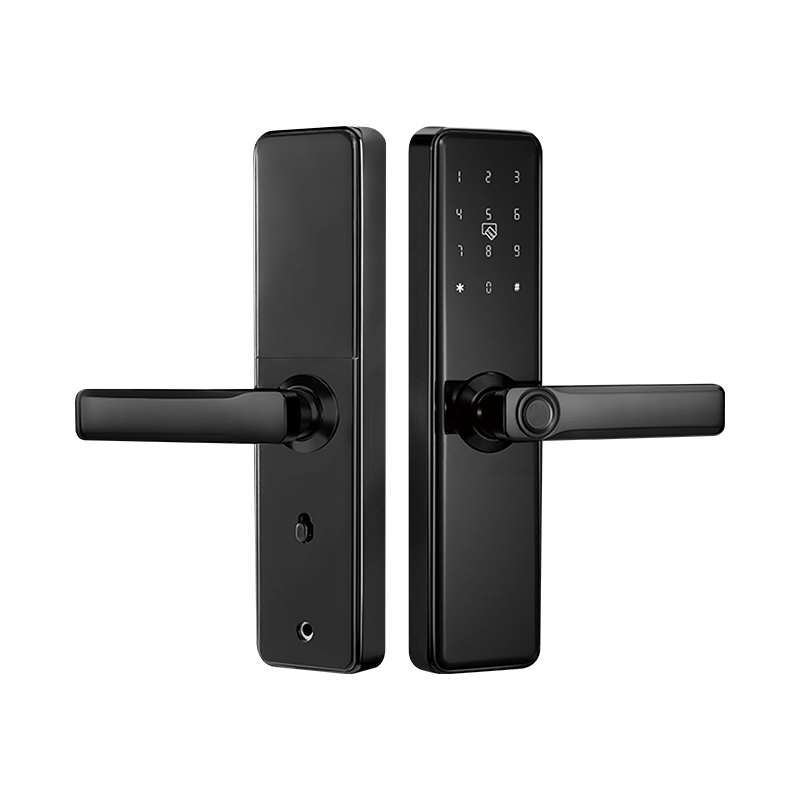
A smart door lock is not simply a keypad attached to a bolt mechanism. It is an access management device that replaces the binary state of locked and unlocked with a programmable permission system. Different household members can hold different credentials — a fingerprint, a PIN, a mobile app authorization, or a combination — and those credentials can be added, modified, or revoked without changing the physical hardware.
This credential flexibility is what separates smart lock convenience from simple mechanical convenience. A traditional lock can only be opened by whoever holds a key. A smart lock can be opened by whoever holds an authorized credential — and that authorization exists in software, not in metal.
The practical implications for a household:
- Children can be assigned PIN codes that work after school hours but expire at a set time each evening
- Temporary access can be granted to a cleaning service or contractor for a specific window and then automatically disabled
- A family member who regularly arrives home late no longer wakes anyone with a key turn — they authenticate silently at the door
- Remote unlocking through a connected app allows a resident to admit a visitor or delivery person without being physically present at the door
Each of these functions reduces a specific point of friction that households with traditional locks manage through workarounds — spare keys, waiting at home, or manual coordination.
How Keyless Entry Changes the Daily Rhythm of a Household
Removing the Physical Key From the Equation
The inconvenience of physical keys is so normalized that many people do not think of it as a problem worth solving. But considered specifically, the key management task in a multi-member household involves coordinating multiple copies of a physical object across people with different schedules, ensuring that no copy is misplaced or falls into unintended hands, and replacing the entire system if a copy is lost.
A Smart Lock for Home Door eliminates that coordination overhead. There are no copies to manage. There is no locksmith call if a key is lost. Access is administered through the lock's management interface, and the only thing that matters is whether an authorized credential is present — not whether a specific physical object has traveled from the right person to the right place at the right time.
For families with school-age children, this shift is particularly meaningful. A child with a memorized PIN or enrolled fingerprint can enter the home independently without carrying a key that could be lost, left at school, or used by an unauthorized person. The parent receives a notification when the child arrives home — a functionality that a physical key cannot provide.
Access Management for Multi-Member Households
How Permission Levels Work in Practice
A connected smart lock running through an app or a hub allows the primary administrator to assign access levels to different household members and guests. This is not a feature that requires technical sophistication to use — most systems present it through a straightforward interface where credentials are added or removed with a few taps.
Typical permission structures in residential smart lock systems:
- Full access — household members with permanent, unrestricted entry authorization
- Scheduled access — authorized users (family members, regular visitors) whose credentials are active only during defined time windows
- Temporary access — one-time or limited-duration credentials for contractors, guests, or delivery personnel
- Notification-only access — the lock records and reports entry events without restricting them, providing an audit trail of who entered and when
For households with elderly members, the access management layer also reduces the risk of lockout. An elderly parent who might misplace or forget a key can instead use a fingerprint or a simple PIN that does not require carrying anything. If the system supports it, a family member can remotely verify that the door has been locked or unlock it if the parent is locked inside during an emergency.
Is a Smart Lock Actually Secure?
Understanding the Security Trade-Offs
Security concerns about smart locks are legitimate and worth addressing directly. The transition from a purely mechanical system to one with electronic and software components introduces attack surfaces that do not exist in a traditional lock.
The security considerations relevant to residential smart lock use:
Electronic access methods. Fingerprint recognition, PIN codes, and app-based unlocking all depend on software and hardware functioning correctly. Modern smart locks use encryption for wireless communication and incorporate anti-tamper features such as alarm triggers on repeated failed entry attempts. These protections are meaningful, but they are contingent on the lock being maintained and updated by the manufacturer.
Physical security. The lock body itself still requires adequate mechanical strength to resist forced entry. A smart lock with a weak physical housing provides poor security regardless of how sophisticated its electronic features are. Evaluating the build quality and certification of the lock body is as important as evaluating the electronic features.
Backup access. Power outages and battery depletion are real scenarios for battery-operated smart locks. A well-designed Smart Lock for Home Door includes a mechanical key override or an external power input that allows entry when the primary electronic system is unavailable. Buyers who do not verify this feature may find themselves locked out when the battery dies.
Network security for connected models. Smart locks that communicate with a home network or cloud service for remote access introduce network attack risks that offline models do not. Using a dedicated, secured home network for smart devices, keeping firmware updated, and choosing locks with end-to-end encryption for remote functions are practical precautions.
Smart Lock for Wooden Door: Installation Considerations
Not Every Lock Fits Every Door
Door material and construction affect which smart lock models are compatible and how installation should be approached. Wooden doors represent the most common residential door type in many markets and are generally well-suited to smart lock installation, but some specific considerations apply.
For a Smart Lock for Wooden Door installation:
- Door thickness range — most smart locks specify a compatible door thickness range, and wooden interior doors are sometimes thinner than exterior doors. Verify the lock's thickness specification against the actual door before purchase.
- Existing hardware cutouts — smart locks that retrofit into existing deadbolt or knob hardware positions require that the new lock's bore dimensions align with or accommodate the existing cutout. Mismatched bore patterns require additional carpentry work.
- Door reinforcement — wooden doors in older buildings may have degraded wood around the lock position from years of use, moisture, or previous hardware changes. Reinforcing the door frame and strike plate area before installing a smart lock improves both mechanical security and installation stability.
- Latch throw compatibility — the bolt throw length of the smart lock must be compatible with the door frame's strike plate depth. This is a dimension to verify specifically for retrofit installations.
Most smart lock manufacturers provide compatibility guides for common door types, and a careful measurement of the existing door hardware position resolves most installation uncertainties before purchase.
Smart Lock for Office Door: Different Demands, Shared Technology
How Commercial Access Needs Differ From Residential Ones
A Smart Lock for Office Door applications shares the underlying technology with residential models but faces a different operational environment. Office access management involves more users, more varied schedules, higher traffic frequency, and often integration with HR or building management systems that residential locks do not encounter.
Key differences in office context:
- User volume — an office lock may need to accommodate dozens or hundreds of enrolled credentials rather than the handful that a household requires
- Audit trail requirements — businesses often need records of who entered which areas and when, for security compliance or investigation purposes
- Integration with access control systems — larger offices may require a smart lock that communicates with an existing access control infrastructure rather than operating as a standalone device
- Durability under high cycle count — a door used many times daily places mechanical stress on the lock mechanism that residential use does not. Commercial-grade smart locks are built to higher cycle count specifications than consumer models.
For small offices and home office settings, the same Smart Lock for Home Door products often work adequately. For larger commercial deployments, products specifically designed for commercial duty and access management scale are a better fit.
Comparing Smart Lock Access Methods for Different Household Needs
| Access Method | Suitable Users | Convenience Level | Security Consideration | Backup Needed? |
|---|---|---|---|---|
| Fingerprint | Adults, older children | High | Reliable, no forgetting | Yes — alternate method |
| PIN code | All household members | High | Risk if shared broadly | Yes |
| Mobile app | Adults with smartphones | High | Network security applies | Yes |
| Physical key (backup) | All members | Standard | Traditional lock risk | Built-in to most models |
| Temporary PIN | Visitors, contractors | High | Expires automatically | Not required for temp use |
| NFC card or fob | Regular users | Moderate | Card can be lost | Yes |
The table reflects that no single access method is without limitation. A well-specified Smart Lock for Home Door allows multiple methods to coexist, so that each household member can use the method suited to their habits and ability, and the household is not dependent on a single point of failure.
What to Evaluate When Choosing a Smart Lock for Your Home
Practical Criteria That Affect Daily Use
Feature lists on smart lock product pages are long and not always organized around what matters in daily use. A more useful evaluation framework focuses on the outcomes the lock needs to deliver rather than the technology it uses to deliver them.
Questions worth answering before selecting a model:
- Does it support the access methods that all household members can use comfortably — including children and elderly family members?
- What happens when the battery dies — is there a mechanical override, and how difficult is it to access?
- Does it require a hub or a continuous internet connection, or does it function locally without network dependency?
- How straightforward is the credential management interface for adding and removing users?
- Is there a notification system that informs the administrator when the door is opened or when an incorrect credential is used repeatedly?
- What is the product's update and support lifecycle — will the manufacturer continue to support the software for a reasonable period after purchase?
The answers to these questions shape which product suits the household rather than which product has the longest feature list.
Sourcing Smart Locks for Residential and Commercial Distribution
For distributors, property managers, and procurement teams sourcing smart locks at volume, product quality consistency and after-sales support become as important as the features listed on the specification sheet. A lock that works well in the first month but develops firmware issues or mechanical wear problems within a year creates a service liability that affects both the distributor's reputation and the end user's experience. Yongkang Ruian Lock Industry Co, Ltd. manufactures smart lock products for residential and light commercial applications, with product lines covering fingerprint, PIN, and app-controlled models in configurations suited to wooden doors, metal doors, and office access applications. Their production capability supports Wholesale Smart Lock supply and OEM arrangements for distributors who require consistent quality across large order quantities. If you are evaluating smart lock products for a distribution program, a property management portfolio, or an OEM supply arrangement, reaching out to discuss product specifications, available configurations, and order terms is a practical way to align the product range with your market's actual entry-level and performance requirements.
Recommended Products

Ready to Begin?
Product Categories
Contact Information
 Email: [email protected]
 Phone: +86-13575699186
 Address: No.135, Wanyu Road, Zhiying Industrial Zone, Yongkang City, Zhejiang Province, China.
QR Code
Copyright © Yongkang Ruian Lock Industry Co, Ltd. All rights reserved.
